
For security reasons, we are unable to provide an alternative way to access the machine without the key. If you’re locked out, your only option is to contact a local locksmith. In some cases, they may be able to pick the lock or make a copy of the key for you, but drilling may required.
If the lock is drilled or damaged during this process, you will need to purchase a new lock and key set and install it yourself or have the locksmith install it for you. Be sure to double-check the lock measurements before ordering, as various sizes are available.
We strongly recommend keeping a second key in a separate location, and each machine comes with two keys for this purpose. You can make additional copies of the keys at most locksmiths.
Nayax is a separate company that owns the credit card reader. You should have received an email from them asking you to create an account. Once your account is set up, the reader should work automatically with no additional steps. For guidance, see Step 0 in our Vending Machine Quick Start Guide.
If you encounter any issues with the credit card terminal, you will need to contact Nayax directly, as we do not have access to their systems. You can reach them by:
Phone: Try calling their support line.

Support Ticket: Submit a request here.
These are the primary ways to get assistance from Nayax.
Each tray must be linked to a unique product listing. A single product listing cannot be assigned to multiple trays.
In the example below, Cup Noodles is using product number 0016 and has been assigned to two trays. Because of this, the machine will not display it correctly.
🛠️ How to Fix It
If you wish to watch a video guide, click here.
To sell the same item in multiple trays, you need to:
Create duplicate product listings—one for each tray.
Use the same name, image and price.
Each listing will automatically receive a different product number (for example, 0016 and 0017).
Assign each product number to a different tray
Tray 031 → Product 0016
Tray 032 → Product 0017
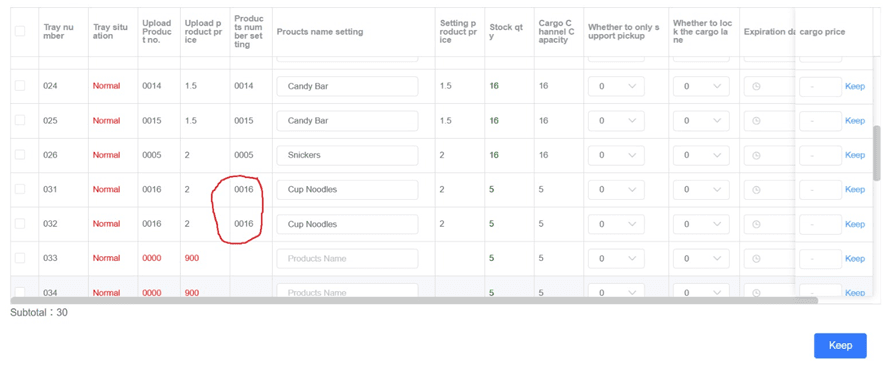
Once each tray is linked to its own product listing, you will need to re-download the product information to the machine using the "Product Shortcut Key". The product will then display and function correctly.
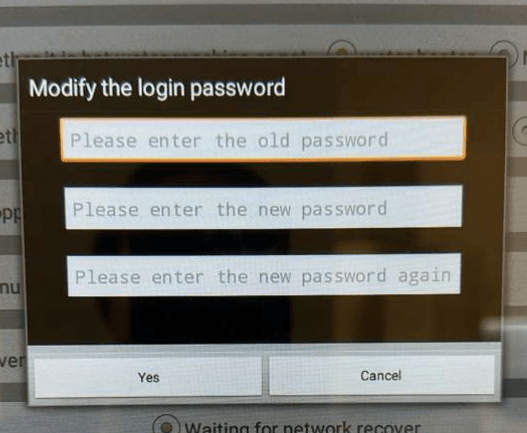
Our machines use one of the following default passwords:
888888 (six 8s)
12345678
If you are prompted to create a new password, we strongly recommend setting it to 88888888 (eight 8s) so it’s easy to remember and avoids future access issues.
Yes. You can test the machine using a generator. Without cooling, the machine uses about 150–160W, and with cooling on it draws 600–620W. For testing, it’s easiest to run it without the cooler (there’s a separate switch for that). A generator rated at 800W or more is sufficient to safely power one machine at a time.
The machine is designed for normal indoor conditions and should not be exposed to freezing temperatures, as below-freezing temps can damage internal components and refrigerant.
- Minimum temperature: 0 °C (32 °F). If operating near or below 40 °F (≈4 °C), consider using a space heater or moving the machine to a warmer location.
- Optimal indoor conditions: Above freezing, ideally above 45 °F (7 °C).
- Maximum temperature: 100 °F (≈38 °C) with up to 85% humidity. Exposure above these levels can damage the machine.
The machine is suitable for indoor spaces such as offices, warehouses, or businesses that maintain these temperature ranges.
No, the machine does not support Wi-Fi 6 (802.11ax). It is compatible with standard Wi-Fi networks using 2.4 GHz and 5 GHz bands (Wi-Fi 5 / 802.11ac).
The system runs on China Standard Time and has a slight processing lag. This means each “day” (e.g., March 30) actually covers March 30 in Beijing time.